Gartner and Static Analysis

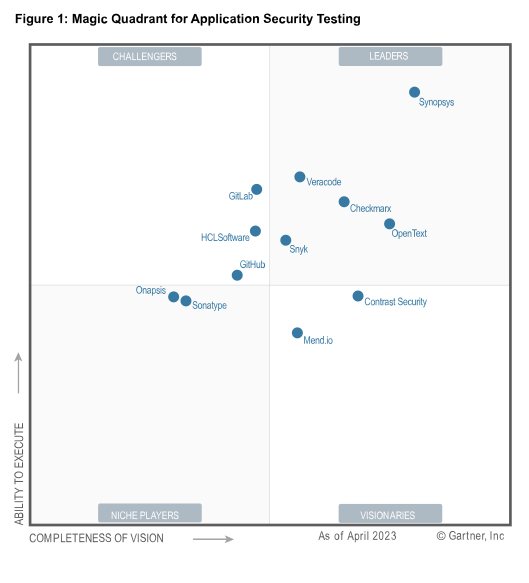
James McGovern recently wrote a post on Gartner’s static analysis (SA) report. Among other things, he lamented the lack of actionable guidance within the report. A lack of implementation guidance doesn’t shock me from Gartner, I can’t say I expect that from them.

I can help James and community out by giving some of that guidance myself. I’ll try to do so in a tool-independent way. This topic deserves more than a “blog entry” format (admitting Cigital’s propensity for longer entries ;-)) so if people want more information on the topic, they can ping me.

In essence, you want to know the following about static analysis tools:

  1. Who is going to run it (how will owners shepherd it)?
  2. How much effort is it going to take to run (what budget will I need to support it)?
  3. When do I run it and how often (Where does it fit within my SDL?)
  4. What it’s going to find (How will the results enter/impact my organization)?
  5. What won’t it find (How does it play with the rest of the assurance ecosystem)?

[Market Adoption and Making Your Choice]
Gartner seems underwhelmed by Microsoft’s ability to effect the commercial static analysis market. Cigital has always believed these technologies would make great features of a compiler/IDE and so we’re also disappointed. They’ve got great technologies but don’t exploit them commercially. I still like their freely available FXCop but this opinion isn’t popular. Perhaps that’s because I see a lot of value to FXCop as a unit testing framework that enables security test and other people are comparing it to glossy commercial tools like Fortify and Ounce run by security analysts in a very hands-off fashion. Who’s considering the tool really does make a huge difference in how it will fare.

From my perspective, the most successful SA tool vendors have made answering the “who should adopt the tool” question more difficult as they’ve waffled on licensing models. By the seat? By the core? By the KLoC? I’ve gotten complaints from prospective tool buyers indicating that a leading tool vendor’s price was 10X another vendor’s. Before you ask “Which one?”: I’ve heard specific examples in opposite directions!

Certain tools will look better to different potential buyers. Experience has shown positive response to Coverity’s C/C++ results from developers. Application security groups like Fortify and Ounce’s products, and several years ago, I saw QA Managers in two very different firms go ga-ga over Klockwork’s tool. I attribute people’s impressions not to a product vendor focusing on quality or security but to how closely the tool vendor’s conception of how roles interface with their tools throughout the vulnerability management and software development life cycles matches the organization’s own structure. Up until a few years ago I don’t believe SA vendors had fully conceived the “developer”, “analyst”, “security manager” roles in their products. Ounce was the one exception: they’ve always staunchly believed themselves to be principally a Security Analyst’s tool. Some vendors attempted to unify roles into use of a single interface while others attempted to split the product up into different configurations for each. This created confusion and friction between some adopting organizations and the tool vendor’s license model.

In the end you want SA tools to affect as many developers as possible and to get low-latency scan results as early in software’s life cycle as possible. However, having successfully deployed tools a variety of ways, I’m convinced central deployment is the way to go. Application Security should run the tool. This will help manage rule/configuration update, as well as central measurement collection, risk management, and issue tracking. How do we get low-latency and early-lifecycle centrally? Treat the tool as a service. More on that later.

Notable exceptions to the central deployment model include business units possessing one or more of the following characteristics:

  • Acquisitions of previously successful, culturally-independent companies
  • High-quality product development teams
  • Fundamentally different SDL, development platform, language, and toolkits

For in-unit deployment one can “run locally” but must “report centrally” supporting security goals involving measurement and risk management. And, let’s be clear: if a business unit has a wicked-good continuous integration/build-management group, they-by all means-should be tapped to integrate with the SA service. Cigital and its clients have had success in integrating both the front (code submission) and back-end (bug/issue tracking) with Fortify and a variety of open source build/CI/bug-tracking products. This maintains a central model, but reduces latency dramatically.

[How Much Effort]
I’m sorely disappointed in the honesty of tool vendor sales-folk regarding level of effort. One of my first analogies for SA tools is this: Did your company buy Mercury products for load and performance testing? Think of your SA tool like Mercury–you’ll need at least as much money to deploy and implement the tool organization-wide as the licenses cost you. Sorry.

Organizations with more than 2-300 developers should plan on the following:

  • 3-4 man weeks to do initial tuning and pilot implementation
  • 4-16 man hours / large application to integrate with the static analysis tool and assure appropriate configuration
  • 4-8 man hours / 50-100KLoC (language-/complexity-dependent) to triage results on a new-application scan
  • 1 person / year as tool shepherd (app integration, custom-rule creation, rule-pack maintenance and release, support)

Organizations get into trouble when their SA tool enjoys broad acceptance by the organization before they effectively manage the submission and results triage/documentation process. My data indicates code submission can burn 8-24mhrs / application if security groups don’t ‘remember’ (or automate) the submission and scan setup process. Security groups doing scans centrally and hand-writing code review results can waste another 16hrs documenting their findings / application.

…think about it: if your organization allots a week / tool-assisted code review and wastes 24 hours getting the tool’s first result set and 16hrs documenting findings… that only left 10 hrs to actually review the code! Since I believe that 4-8 hrs / 50-100KLoC is necessary to triage, you can imagine how deep I think such code reviews are :-P At Cigital, we’ve got dramatic benefits to depth by decreasing cost of submission and reporting. This is key to scaling SA efforts. Those adopting tools will feel overwhelmed if they don’t plan to solve submission and reporting problems before wider roll-out.

[How Often]
As often as possible. If you’ve got a Continuous Integration initiative (CI), engage those folk. If you deploy your tool purely centrally, plan to scan each high-risk application at least once / release. No, to my knowledge, there isn’t a good answer to the “can these tools do incremental (partial) scans”. You should always keep old results around though, as they’ll (along with other measures) help you understand whether more or less vulnerabilities are being caught during each scan. Remember though, every time you add a rule to the scan, your vulnerability-finding bar just moved and your metrics might be thrown off.

Ounce, Fortify, and Klocwork seem pretty good about determining whether or not they’ve found a particular issue in a previous scan or not. This includes situations where code blocks move around a bit. This means that running regression scans to determine whether or not an issue has been fixed is viable. I can’t comment on Coverity’s capabilities here.

[What's it going to find]
I’m impressed that Fortify has published its vulnerability taxonomy and a bit shocked that others haven’t produced as public a resource. I’m excited too that vendors have agreed to comply with CWE labels when they report findings. I will say what I always do on this topic though: test the tool on your own code though. You simply don’t know what it will find until you throw all your idiosyncratic build, language, toolkit, and platform nonsense at the particular tool you’ve selected.

[What won't it find]
I’m continually shocked as to how much one can find by running tool Y after tool X on the same piece of code (replace X and Y as you see fit). As I’ve written time-and-time-again, the corner cases and exceptions missed by each engine are baffling. Let me put things in perspective for you: three of my clients have reported that their SA tool deployment find 17, 33, and 50% of the total number of issues found by assessment efforts respectively. If these percentages hold for your organization, inside a coding bug realm then your job is at best 50% done having run the tool and triaged its results.

Considering that Microsoft and Cigital believe that “bugs” account for only 50% of the vulnerability space, that leaves you unaware of 75% of your application’s vulnerability at the end of triage. As I always say, “use the tool to facilitate code review and increase a reviewer’s understanding of the code–not as a code reviewer that finds bugs automatically.”

Good luck out there, I’d love to hear about your particular experiences.
-jOHN

3 Responses to “Gartner and Static Analysis”

  1. Andy Steingruebl Says:

    John,

    How many customers have you met that are running more than one SA tool? From what I’ve seen the types of rules that the different tools (much less their coverage/accuracy) don’t perfectly overlap, and in some cases the overlap is only around 50% between two of tools you mention.

    I don’t feel that deploying more than one SA tool is really sustainable, but as you point out they do seem to target certain audiences. Some of the tools focus a exclusively on security, some target mostly (75% or greater) what would generally be considered quality but not security issues, and some overlap but don’t cover the same space.

  2. jOHN Says:

    Andy,

    Good question. If you count freely available tools (a good corner case is those running both Fortify and Findbugs–which itself is bundled with Fortify these days) then I have quite a few. Outside that, I’d say the most common configurations are:

    * [Ounce | Fortify] + FXCop
    * Fortify + Coverity

    ‘Most commonly asked question recently? “Can I save money on Fortify licenses by replacing SOME of my scans with Veracode…?”

    I think there’s value in running multiple tools or combining a static analysis tool with a pen-testing practice. As I preach: a good initial objective is to establish an assessment plan that you defend to management: “We’re looking for [these things] in our apps.” From there seek to increase your ability to find problems or reduce the cost of maintaining your existing assessment capacities. Managing to this message is far more desirable than defending license seats or code review head count, IMO.

    The BIG problem here is normalizing findings and presenting a unified assessment report at a non-prohibitive cost. Some might not be surprised that the biggest issues one might run into here is not technical but organizational or political. People don’t like:

    1) Combining static and dynamic testing because they often report up through different management (each defensive of its budget and headcount)

    2) Asking for money to augment their expensive SA implementation with an freely available alternative–even if that alternative addresses a complimentary need.

  3. Andy Steingruebl Says:

    Yeah, I see that political aspect of it. What I find interesting is that tools like Coverity and Klocwork target Developers, QA, and Architects (their architecture analysis products) but don’t really pitch as much to Security folks. I think the Gartner report is fairly spot on here. That said, I think the “simplicity” of their approach is pretty compelling.

    I guess this situation isn’t that different from the situation in the development and build tools space. You have:

    – Purify
    – valgrind
    – multiple compilers all with different incompatible flags and code parsing

    And people wanting to run all of them. Most of these things cost money to run, in either fees, people, or both. They all chip away at the problems you’d find in C/C++ code, and yet no one is offering a suite of tools that covers everything, can pipeline it, put it all into 1 reporting database, and not require me to instrument my build process 5 different times. An unfortunate situation to be sure….

Leave a Reply